
How to Automate Meeting Notes and Action Items Without Losing Accountability
Most service businesses have the same quiet leak. A good meeting happens on Tuesday. Everyone leaves agreeing on what needs to happen. By Friday, nobody can quite remember who said they would send the revised quote, whether the client approved the new timeline, or why the team decided against the first option. The meeting was fine. What happened after it was not.
Automating meeting notes and action items is one of the most useful things a small business can do, and one of the easiest to get wrong. Done badly, it produces a long, unread transcript that nobody trusts. Done properly, it turns every meeting into a short record of decisions and a list of owned tasks that land where people already work. This article explains what that looks like and how to build it without making your team's life harder.
What broken meeting follow-up looks like
Before you automate anything, it helps to recognise the symptoms. You may have more than one of these at once.
- Notes live in whoever's notebook or laptop they were typed into, so nobody else can find them.
- Action items are written as general statements such as "look into pricing" with no owner and no date.
- Decisions are buried in a paragraph of discussion, so the same question is reopened a month later.
- The person who ran the meeting spends the next hour typing up a summary, and that task gets skipped when they are busy.
- Clients are told "we will come back to you" and the promise lives only in someone's memory.
If you recognise these, the problem is not that your team lacks discipline. The process has no defined end. Nobody has decided what a finished meeting looks like, so everyone improvises.
Why a transcript is not the answer
The first instinct is to buy a tool that records and transcribes every call. Transcription is useful, but a transcript is raw material. It is not a record of what was decided. A one-hour call produces a wall of text, and the person who attended the meeting still has to work out what matters.
The automation worth building sits on top of the recording. It takes the conversation and produces three specific things: a short summary, a list of decisions, and a list of actions with an owner and a due date. Each of those goes to a defined place. If you build only the transcript, you have automated the part that was never the bottleneck.
There are also questions to settle before recording client calls at all, including consent and where the recording is stored. Our guide to how AI note takers work and what to check before using one covers those in plain language.
Step one: Assess what a finished meeting needs to produce
In The Claro Build Framework, every build starts with Assess. For meetings, that means sitting down and answering a few uncomfortable questions before touching any tool.
- Which meetings actually need a written record? A weekly internal check-in and a client kick-off call are not the same. Most businesses find that only a handful of meeting types need formal capture.
- Who reads the notes today, and what do they do with them? If nobody acts on them, the problem is upstream.
- Where do tasks currently live? Your project tool, your CRM, a shared spreadsheet, email? Actions should end up in the place people already check every day, not in a new one.
- Who is accountable for a task that nobody claims? Every process needs a fallback owner, or unassigned actions simply disappear.
This is the point where many businesses discover they have no agreed format. One person writes bullet points, another writes paragraphs, a third sends a voice note. You cannot automate an inconsistent process. You can only automate a consistent one, so the first deliverable is a single agreed structure.
Step two: Design the output before the tool
A workable meeting record for a service business usually has five parts:
- Purpose and attendees. One line each.
- Summary. Three to five sentences, written for someone who was not there.
- Decisions. Each stated as a clear sentence, with a short note of the reason.
- Actions. Each with one named owner, a due date and a link to the related client, matter or project.
- Open questions. Things raised but not resolved, so they do not vanish.
Keeping the reasons beside the decisions matters more than it sounds. It is the least costly way to stop old arguments returning. If you want to go deeper on that idea, see why documenting decisions matters as much as documenting processes.
Then design the routing. Decide where each part goes. The summary might be filed against the client record. Actions might become tasks in your project or task tool, assigned automatically. Decisions might be appended to a running decision log. A follow-up email to the client might be drafted for the meeting lead to review. Notice the word drafted. The system prepares, a person approves.
Step three: Build with a person in the loop
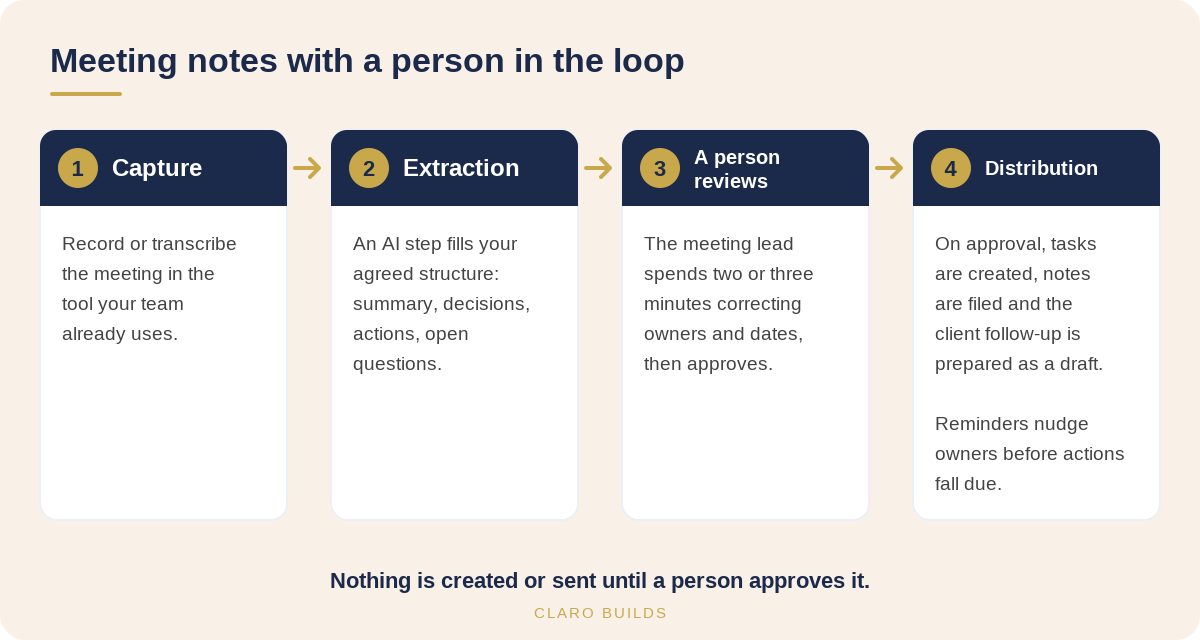
A typical build has four moving parts.
Capture. The meeting is recorded or transcribed through whichever tool your team already uses for calls. For in-person meetings, a short voice memo or typed shorthand works as the input.
Extraction. An AI step reads the transcript and fills in your agreed structure: summary, decisions, actions, open questions. This is where the AI earns its keep, because pulling structure out of messy conversation is something it does well. It is still not infallible. It can miss an action that was agreed with a nod, or assign a task to the wrong person when two people share a first name. That is why the next part exists.
Review. The meeting lead gets the draft and spends two or three minutes checking it. They correct owners and dates, delete anything that is wrong and approve. Nothing is created in your task tool or sent to a client until this approval happens. This single step is what separates a trustworthy system from one that quietly fills your task list with errors. The principle is the same one we explain in the difference between AI that drafts and AI that decides.
Distribution. On approval, the automation creates the tasks, files the notes against the right record, updates the decision log and prepares the client follow-up email as a draft in the sender's own mailbox. If a task has no due date, the system asks for one rather than guessing.
A small but important detail: add a reminder step. When an action is two days from its due date, the owner gets a nudge in the tool they already use. When it is overdue, the meeting lead sees it. This is the part that actually changes behaviour, and it is the part most businesses skip.
Common mistakes to avoid
- Recording everything. Capturing every internal chat creates storage and privacy headaches without improving anything. Start with the meetings that carry client commitments.
- Sending summaries straight to clients. An unreviewed AI summary sent to a client is a risk. A wrong date or a misattributed promise is difficult to take back.
- Creating a new place to look. If actions land in a tool nobody opens, the system fails regardless of how clever it is.
- Skipping the format agreement. If the team cannot agree on what a good record looks like, the output will feel arbitrary and people will stop reading it.
- Ignoring confidentiality. Meetings with clients often include sensitive details. Know where recordings and transcripts are stored, who can see them, and how long they are kept, and follow current official guidance for your sector.
Step four: Sustain it
The last stage of the framework is Sustain, and meeting automation needs it more than most. Habits drift. Someone stops approving the drafts. The agreed format creeps back to free text. Task owners stop marking things complete.
Build in a light review. Once a month, someone looks at a sample of meeting records and asks three questions. Were the actions accurate? Were they completed? Did anyone read the summaries? If the answer to the third question is no, simplify the format. Shorter records that are read beat thorough records that are ignored.
Handover matters here too. Under The Adoption Standard, any system we build is handed over with a structured 45-minute call and documentation written while the system is built. For a meeting workflow, that documentation should say where the approval step lives, what to do when the AI gets something wrong, and who takes over when the usual meeting lead is on leave. Without that, the process depends on one person's habits, which is exactly the fragility you were trying to remove. Our article on how to run a handover that actually sticks goes through what a good one covers.
Is it worth automating?
Honestly, not every business needs this. If you hold two or three meetings a week and one person already writes tidy notes that everyone uses, leave it alone. Automation earns its place when meetings are frequent, when several people run them, or when client promises made in conversation are slipping through the gaps. If the real issue is that nobody owns follow-through, tooling will not fix that, and you will make the confusion move faster.
If you do decide to build, begin small. Pick one meeting type, such as the client kick-off call. Agree the format, build the capture, review and routing for that one type, and run it for a few weeks. Fix what breaks. Then extend it to the next meeting type. A modest system that the team trusts is worth far more than an ambitious one they quietly work around.
For more practical builds like this one, browse the How to Automate This section, where each guide follows the same approach: fix the process, design the output, build with a human check, then keep it working.
Frequently Asked Questions
Is it safe to record client meetings with an AI tool?+
It can be, but you need to settle a few things first. Tell attendees the call is being recorded and get their agreement, check where the recording and transcript are stored, who can access them and how long they are kept, and read the tool's terms on how your data is used. Rules differ by country and sector, so follow current official guidance and your professional body's rules where they apply.
Will AI get action items wrong?+
Sometimes, yes. It can miss an action agreed informally, assign a task to the wrong person or invent a due date. That is why a good build includes a short human review before any task is created or any message goes to a client.
Do I need a special tool to automate meeting notes?+
Usually not. Most teams already have a calling tool, a task tool and an email system. The build connects these with a structured summary step in the middle. The format and the review step matter more than which brand of tool you pick.
How long should the review step take?+
Two to three minutes per meeting is a reasonable target. If it takes much longer, the structure is probably too complicated or the meeting covered too many unrelated topics.
What if my team already takes notes in different ways?+
That is common and it is the first thing to fix. Agree one short structure covering the summary, decisions, actions and open questions. Automation cannot produce consistent results from an inconsistent process.

Lerato Kgonoti
Founder and Director, Claro Builds
Lerato Kgonoti is the founder and director of Claro Builds, an operations and AI consultancy helping small and medium-sized service businesses implement automation, integrate AI into their daily operations and equip their teams with the practical skills to keep up with an increasingly automated world. Lerato founded Claro Builds on the belief that AI should be accessible, practical and human, not a privilege reserved for large enterprises, but a genuine advantage available to every service business ready to use it. Through builds, audits and private workshops, Claro Builds closes the gap between where small businesses operate today and where they need to be.
Related Articles
How to Automate This: A Practical Guide to Deciding What to Automate First in Your Business
A practical, no-hype framework for deciding what to automate first in your business, before you buy any software or fix anything that was never broken in the first place.
How to Automate Client Communication Without Losing the Personal Touch
Automating client communication only feels robotic when you automate the wrong part of the conversation. Here is how to automate triage and drafting while keeping judgement calls with a person.
How to Automate Invoice Processing Without Losing Control Over Approvals
Automating invoice processing goes wrong in two directions: automating approvals away entirely, or automating nothing while still doing all the manual data entry. Here is how to automate the data extraction, PO matching and ERP updates while keeping a real person in the loop for anything above a threshold or genuinely unusual.