
How to Automate Payroll Prep Without Automating the Payment Itself
When a founder tells us payroll is a headache, they rarely mean the actual payment run. They mean the two or three days before it, chasing timesheets from people who forgot to submit them, cross-checking leave requests against a separate calendar, and manually catching the one entry that looks wrong before it becomes an expensive mistake.
That prep work is where automation genuinely earns its keep. The payment itself, the actual movement of money, should stay a deliberate, human-approved action every single time. This article is about the hours before that moment, not the moment itself.
Why payroll prep eats so much time
Payroll prep tends to break down for a few consistent reasons. Timesheets live in different places depending on who submitted them, some in a spreadsheet, some in an email, some scribbled and handed over. Leave records live in a separate system that does not talk to whatever is being used to calculate hours. And discrepancies, someone clocking unusual overtime, a leave request that was never actually approved, only get caught if someone happens to notice them while eyeballing a spreadsheet under time pressure.
None of that is a payroll problem specifically. It is the same pattern that shows up across every one of the operational gaps we cover in our guide to how to automate this: information scattered across places that do not talk to each other, checked manually, under deadline pressure, by someone who has a dozen other things to do that week.
What is worth automating
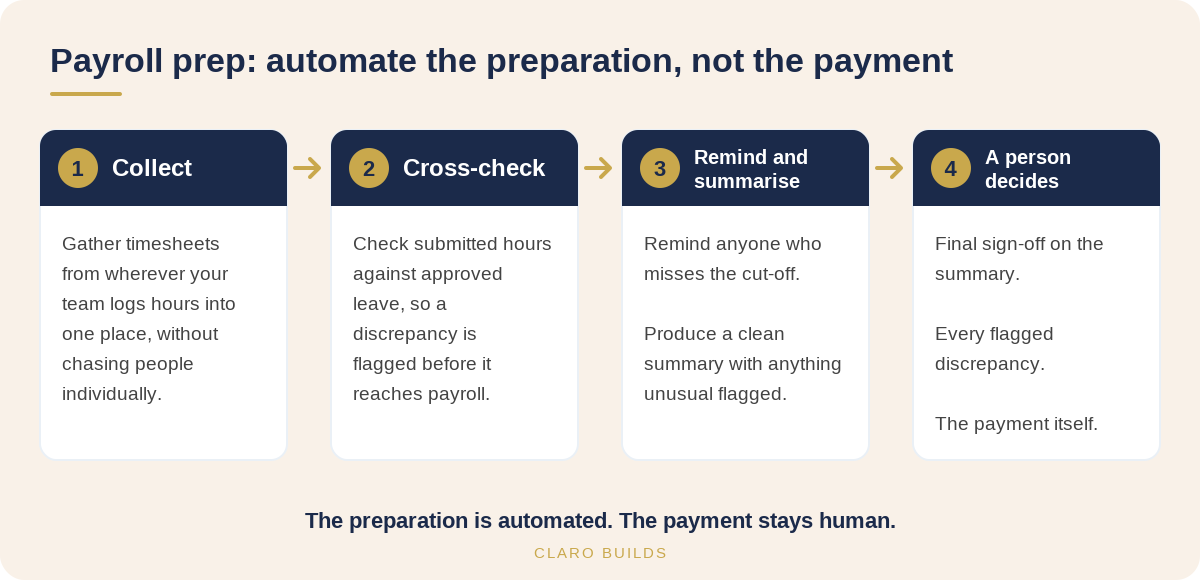
- Collecting timesheets from wherever your team actually logs hours, and consolidating them into one place automatically instead of chasing people individually.
- Cross-checking submitted hours against approved leave records, so a discrepancy gets flagged before it reaches whoever runs payroll, not after.
- Sending automatic reminders to anyone who has not submitted their timesheet by an agreed cut-off, rather than a manager doing that by hand every cycle.
- Producing a clean, consolidated summary ready for review, with anything unusual clearly flagged, rather than buried in a spreadsheet someone has to scroll through.
What must stay human
- Final sign-off on the payroll summary before it moves anywhere near an actual payment run.
- Any flagged discrepancy. A system can catch that something looks unusual, but deciding whether it is a genuine error or a legitimate exception needs a person who knows the context.
- The payment itself. This article is specifically about the preparation stage. Payroll payments should always go through a deliberate, approved, human-authorised process.
Where this fits in the bigger picture
Payroll prep is a documentation problem as much as it is an automation problem. If the rules for what counts as approved leave, or how overtime should be calculated, only exist in one person's head, no automation can reliably apply them. Our article on how to document a process that only exists in one person's head is worth reading before you touch any payroll tooling, because the automation can only be as clear as the rules feeding it. Once those rules exist, how you write them down matters just as much. Our companion guide on how to document a process that actually gets used covers exactly that.
Payroll prep also connects closely to broader financial admin. If your business also handles bulk payments to contractors or suppliers, the same principle applies: automate the gathering and checking, keep every actual transfer of money behind a deliberate human approval.
How we approach this with clients
We run payroll prep through the same four stages as every other build. Assess means sitting with whoever currently handles payroll and mapping exactly where the manual chasing and checking happens. Design means agreeing the rules: what counts as a flag, who reviews it, and what the cut-off deadlines actually are. Build means connecting timesheet, leave, and summary data into one consolidated view. Sustain means revisiting the rules whenever your team's structure, contracts, or leave policy changes, because payroll rules that go stale are how errors creep back in.
A realistic picture of what changes
Before automation, a typical payroll cycle for a growing service business might involve someone manually emailing every team member who has not submitted a timesheet, cross-checking a leave spreadsheet by hand against submitted hours, and hoping nothing was missed before the summary gets passed along for approval. It is tedious, it is easy to make a small error under time pressure, and it usually falls to whoever is most organised on the team, whether or not payroll is actually their job.
After the prep work is automated, that same person spends their time reviewing a consolidated summary with anything unusual already flagged, rather than assembling that summary from scratch every single cycle. The decision-making and the final approval have not moved. What has moved is the hours spent chasing, consolidating, and manually checking, which is exactly the part that added no real value beyond being tedious and error-prone.
Signs your payroll prep process needs attention now
A few signs tend to show up before payroll prep becomes a genuine risk rather than just an annoyance. Timesheets regularly arrive late or not at all without anyone following up consistently. The person who understands the leave and overtime rules is the same person who is often unavailable right when payroll needs to run. And discrepancies get caught, when they get caught, more by luck than by a reliable check. Any one of these on its own is manageable. Several together are a sign the process, not just the workload, needs attention.
Getting buy-in from the team submitting timesheets
Automation on the prep side often fails quietly for a reason that has nothing to do with the system itself: the team submitting timesheets does not understand why the new process matters, so old habits creep back in, a late submission here, a missed leave update there. Explaining plainly why consistent, on-time submissions make payroll faster and more accurate for everyone, not just easier for whoever runs it, tends to matter more than any reminder email the system sends automatically.
Common mistakes
The most damaging mistake is automating the payment step itself without a firm human checkpoint. Payroll errors involving actual money are expensive and difficult to undo gracefully, and no automation should remove the final human decision before money moves.
The second is building the system around one payroll cycle's exceptions and assuming they will not happen again. Overtime rules, new hire types, and leave policy changes all happen more often than founders expect, and a system that cannot flex with them starts producing quiet errors.
The third is skipping the documentation. If the person who built the payroll prep system leaves or moves roles, and nobody else understands the rules behind it, the business is back to manual checking within a single payroll cycle.
It also helps to remember that payroll prep tends to get harder, not easier, as a team grows, since more people means more timesheets to chase, more leave patterns to check, and more chances for a small entry to be wrong. Getting the prep work solid while your team is still a manageable size makes the eventual growth far less painful than trying to fix it under pressure once the volume has already outpaced what one person can reliably check by hand.
Get the prep work automated properly and payroll stops being the two days everyone dreads. It becomes a short review of a summary someone already trusts, with the actual payment still firmly in human hands where it belongs.
Frequently Asked Questions
Should the actual payroll payment be automated?+
No. The payment itself should always go through a deliberate, human-approved step. What can be safely automated is the preparation work before it: gathering timesheets, checking leave, and flagging discrepancies.
What is the biggest time saver in payroll prep automation?+
Consolidating timesheets and leave records into one place automatically. Most of the manual hours in payroll prep go into chasing and cross-referencing information that lives in separate places.
How do we handle discrepancies once they are flagged?+
A flagged discrepancy should always route to a person who understands the context, such as unusual overtime or a leave request that was never formally approved, rather than being resolved automatically.
Does payroll prep automation replace our payroll software?+
No, it works alongside it. Automation handles the gathering, checking, and flagging before the data reaches your payroll software or provider, it does not replace the payroll system itself.
What should we document before automating payroll prep?+
The rules that currently live in one person's head: what counts as approved leave, how overtime is calculated, and what triggers a manual review. Automation can only apply rules that have actually been written down.

Lerato Kgonoti
Founder and Director, Claro Builds
Lerato Kgonoti is the founder and director of Claro Builds, an operations and AI consultancy helping small and medium-sized service businesses implement automation, integrate AI into their daily operations and equip their teams with the practical skills to keep up with an increasingly automated world. Lerato founded Claro Builds on the belief that AI should be accessible, practical and human, not a privilege reserved for large enterprises, but a genuine advantage available to every service business ready to use it. Through builds, audits and private workshops, Claro Builds closes the gap between where small businesses operate today and where they need to be.
Related Articles
How to Automate This: A Practical Guide to Deciding What to Automate First in Your Business
A practical, no-hype framework for deciding what to automate first in your business, before you buy any software or fix anything that was never broken in the first place.
How to Automate Client Communication Without Losing the Personal Touch
Automating client communication only feels robotic when you automate the wrong part of the conversation. Here is how to automate triage and drafting while keeping judgement calls with a person.
How to Automate Invoice Processing Without Losing Control Over Approvals
Automating invoice processing goes wrong in two directions: automating approvals away entirely, or automating nothing while still doing all the manual data entry. Here is how to automate the data extraction, PO matching and ERP updates while keeping a real person in the loop for anything above a threshold or genuinely unusual.