
How to Automate Support Ticket Routing Without Losing Customer Context
Most support teams do not have a routing problem. They have a definitions problem that shows up as a routing problem. Tickets pile into one shared inbox, whoever is online grabs whichever one looks easiest, and the genuinely urgent issue from a long-standing client sits unread behind a dozen simple password resets.
Automating the routing without fixing the definitions underneath it just means the wrong tickets reach the wrong person faster than before.
Why ticket routing breaks down
Three issues show up again and again. First, there is no shared definition of urgency. One team member treats every ticket with an exclamation point as critical, another works strictly first in, first out, and the client with the actual emergency gets whichever treatment they happen to draw.
Second, categories do not map to who should handle them. A ticket tagged "billing" might need a refunds specialist, an account manager, or a founder, depending on the client, and if the tagging does not account for that, every ticket ends up needing to be manually reassigned anyway.
Third, context gets lost at the handoff. A ticket moves from a general inbox to a specific person, and that person has no idea what was already said, so the client has to repeat themselves, which is often the exact thing that made them frustrated in the first place.
What is worth automating
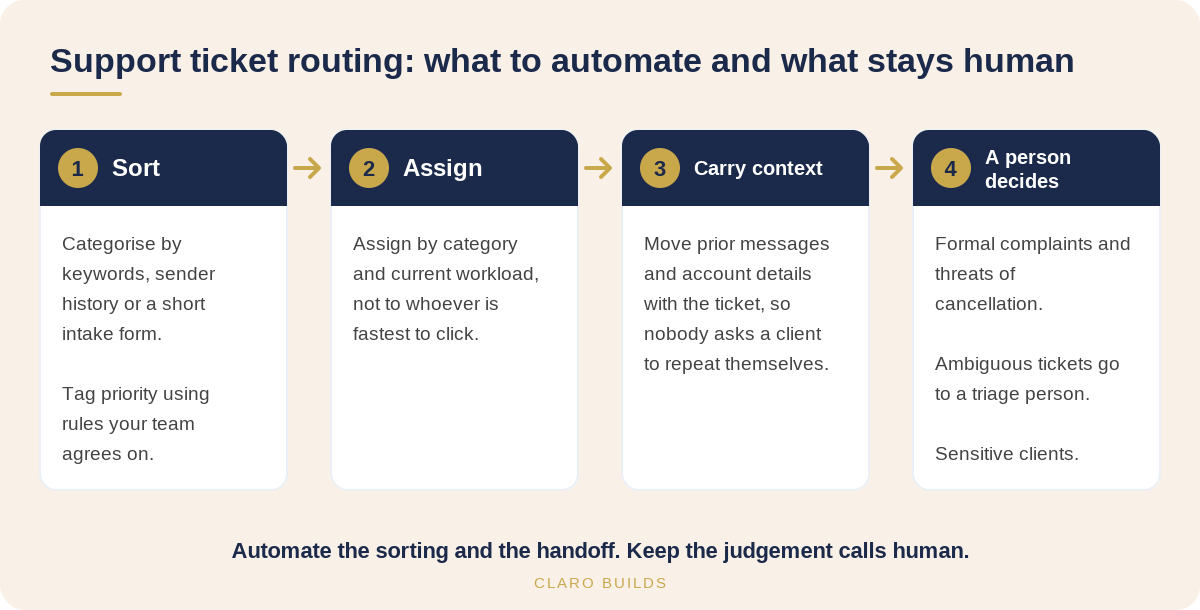
- Initial categorisation based on keywords, sender history, or a short intake form, so tickets do not sit unsorted.
- Priority tagging based on rules your team actually agrees on, such as account type, previous escalation history, or specific trigger words.
- Assignment to the right person or team based on category and current workload, so tickets are not just dropped on whoever is fastest to click.
- Carrying full context, including prior messages and account details, along with the ticket when it moves, so nobody has to ask a client to repeat themselves.
What should stay human
- Anything flagged as a formal complaint or threat of cancellation. These need a person to read the full context and decide the right response, not a rule-based reassignment.
- Ambiguous tickets that do not cleanly match a category. Route these to a triage person rather than forcing them into the nearest available bucket.
- Any ticket involving a client your business has flagged as sensitive, whether that is a long-standing account, a public-facing client, or one with a difficult history.
This mirrors the approach behind most of the builds in our guide to how to automate this: automate the sorting and the handoff, keep the judgement calls with a person who has the full picture.
Start with the process, not the tool
Before choosing routing software, sit down with whoever currently triages tickets and map out, honestly, how decisions actually get made today. Not how the org chart says it should work, how it actually works. That map becomes your ruleset. Skipping this step is the single biggest reason routing automations get quietly abandoned within a few months of going live.
This diagnostic step is the same one we apply to every build, and it is worth reading alongside how to tell the difference between a process problem and a tooling problem, because ticket routing is very often the second one dressed up as the first.
Where this connects to other channels
If your business handles support over WhatsApp as well as email or a help desk, routing logic needs to work across both, or you end up with two disconnected systems and a client who gets a different experience depending on which channel they happened to use. Our guide on automating WhatsApp customer support covers the channel-specific side of this. The same principle applies to any client-facing automation, including how you automate client communication more broadly: consistency matters more than speed.
The handover that makes it stick
Once routing rules are live, someone on your team needs to own them, adjust them as your business changes, and know exactly how to intervene when a ticket gets misrouted. That is why every system we build is delivered under The Adoption Standard: a structured 45-minute handover call plus documentation written as the system is built, so your team is never guessing how the rules work. This is the handover only, not team-wide training, which is a separate offering entirely.
A realistic example of how this plays out
Picture a ten-person service business that has always run support through one shared inbox. Early on, that worked fine, because there were few enough tickets that everyone could see everything. As the client base grew, the inbox became noise: genuine emergencies sat next to routine questions, and whoever happened to be free grabbed whichever ticket was easiest, not whichever was most urgent.
The fix was not a bigger inbox or a faster team. It was a small set of agreed categories tied to who should actually handle each one, a clear definition of what counts as urgent that the whole team had actually agreed to, and a rule that context always travels with a ticket when it changes hands. None of that required exotic technology. It required the team to sit down and agree on definitions that had never been written down.
Measuring whether routing is actually helping
The clearest sign a routing system is working is that urgent tickets get a response quickly and consistently, not depending on who happens to be online. A second sign is that clients stop having to repeat their issue when a ticket gets reassigned, because the context travelled with it. A third, quieter sign is that your team spends less time each day simply figuring out who should be handling what, and more time actually resolving issues.
If none of that has improved after routing automation goes live, look at the categories first. Misrouted tickets are almost always a sign that the category definitions do not match how issues actually arrive in practice, not a sign that the automation itself has failed.
Getting the team on board with new rules
A routing system only works if the team trusts it enough to stop double-checking it manually. That trust gets built early, by involving the people who currently triage tickets in defining the rules, rather than presenting them with a finished system and asking them to adapt. Someone who helped decide what counts as urgent is far more likely to trust the system when it makes that call automatically, and far more likely to flag it quickly if a rule genuinely needs adjusting.
Common mistakes
The most common mistake is building categories around the software's defaults instead of your team's actual workflow. Off-the-shelf categories rarely match how a specific business actually triages issues.
The second is over-automating escalation. Businesses sometimes route every flagged ticket straight to the founder, which recreates the exact bottleneck automation was meant to solve, just with an extra step in front of it.
The third is never revisiting the rules. Support volume changes, product lines change, and a ruleset built a year ago quietly stops matching the business it was built for.
Done well, ticket routing automation means the right person sees the right issue with the full picture already attached, and nobody has to remember to check three different inboxes to find out what is actually urgent.
Frequently Asked Questions
What is the biggest risk in automating support ticket routing?+
Losing context at the handoff. If a ticket moves to a new person without the prior conversation attached, the client has to repeat themselves, which usually makes the experience worse, not better.
Should every ticket be automatically routed?+
No. Formal complaints, ambiguous issues, and sensitive accounts should route to a person for triage rather than being forced into an automated rule that was not built for that situation.
How do we decide our routing categories?+
Start by mapping how your team currently triages tickets in practice, not how it is written down. The real decision patterns your team already uses are the best foundation for automated rules.
Does ticket routing automation work across WhatsApp and email together?+
It can, but the rules need to be built to handle both channels consistently, otherwise clients get a different experience depending on which channel they use to reach you.
How do we make sure the team actually uses the new routing system?+
This is what a structured handover is for. Under The Adoption Standard, every build includes a 45-minute handover call and documentation written as the system is built, so the team understands exactly how it works.

Lerato Kgonoti
Founder and Director, Claro Builds
Lerato Kgonoti is the founder and director of Claro Builds, an operations and AI consultancy helping small and medium-sized service businesses implement automation, integrate AI into their daily operations and equip their teams with the practical skills to keep up with an increasingly automated world. Lerato founded Claro Builds on the belief that AI should be accessible, practical and human, not a privilege reserved for large enterprises, but a genuine advantage available to every service business ready to use it. Through builds, audits and private workshops, Claro Builds closes the gap between where small businesses operate today and where they need to be.
Related Articles
How to Automate This: A Practical Guide to Deciding What to Automate First in Your Business
A practical, no-hype framework for deciding what to automate first in your business, before you buy any software or fix anything that was never broken in the first place.
How to Automate Client Communication Without Losing the Personal Touch
Automating client communication only feels robotic when you automate the wrong part of the conversation. Here is how to automate triage and drafting while keeping judgement calls with a person.
How to Automate Invoice Processing Without Losing Control Over Approvals
Automating invoice processing goes wrong in two directions: automating approvals away entirely, or automating nothing while still doing all the manual data entry. Here is how to automate the data extraction, PO matching and ERP updates while keeping a real person in the loop for anything above a threshold or genuinely unusual.